

Quick Answer
A+ Content (formerly known as Enhanced Brand Content) is a free tool available through the KDP publishing platform that lets authors add graphics – and some text – to their book listing to make it visually engaging. It shows up under “From the Publisher,” and it can genuinely move the needle: basic A+ Content can increase sales by up to 8%, and well-implemented Premium A+ Content can increase sales by up to 20%.
If you haven’t built this out for your book yet, here’s everything you need to know.
This post is adapted from Chapter Six of my book, The Self-Publisher’s Amazon Playbook.
What Is A+ Content, Exactly?
Amazon offers authors a section for bonus content called A+ (A Plus) Content. It’s a free tool that allows you to add graphics to your book listing to make it more visually engaging and give prospective buyers additional information to help them decide.
With A+ Content, you can add branding, brand stories, detailed product shots, and more about you and the book – content that goes beyond what’s available in the basic listing. Used well, this extra content can increase book sales.
The standard Amazon book listing only allows text up to two thousand characters, with no images or graphics other than the cover. A+ Content changes that. It lets you showcase your book’s distinguishing features, benefits, rave reviews, and brand story in a compelling way.
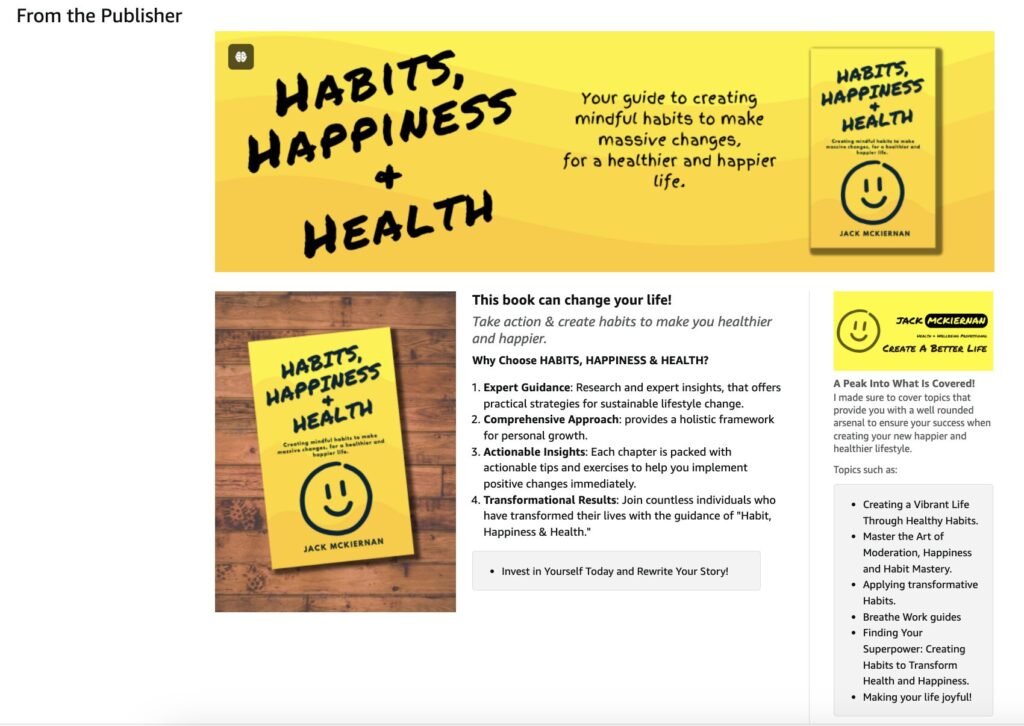
A+ Content appears near the middle of a book listing, under “From the Publisher.” While the exact placement varies, most readers have to scroll to see it.
Here is an example of A+ Content:
Why It’s Worth Doing
A+ Content optimizes your book listing in two important ways:
- SEO value. It’s searchable, and Amazon lets you add alt text (keywords) to each image – more on that below.
- Buyer trust. It improves your listing by giving prospects the additional information they need to make a decision. Quality information and professional-looking graphics help you compete with traditionally published books, and give you the ability to look like you have a big publishing team behind you – which inspires buyer confidence.
Let’s face it. A prospect who discovers your book on Amazon hasn’t learned to trust you yet. They may trust Amazon, but they still need to figure out you – or the quality of your book. They’re cold traffic landing on your listing.
In his book Endless Referrals, one of my favorite authors, Bob Burg, coined the phrase Know, Like, Trust. He said: “All things being equal, people will do business with, and refer business to, those people they know, like, and trust.” Providing prospects with as much information, features, benefits, and social proof as possible increases your trustworthiness in their eyes – and gives them the confidence to take a chance on your book.
A+ content is made up mostly of images, though it can display text too. It offers a way to tell a visual story, which matters because so many prospects are quickly scanning your listing rather than reading it. A relevant picture can convey an idea more effectively than text alone – the human brain processes images 60,000 times faster than text, and 90 percent of the information transmitted to the brain is visual.
The graphical nature of A+ Content also creates a scroll stop, since it often looks very different from the rest of the listing. That contrast adds intrigue and curiosity, and gives you another chance to reinforce your book’s value before the prospect decides.
How to Create It
You build A+ Content from the KDP Marketing page, in the A+ Content Manager. When you create it, you choose between modules to build your layout — up to seven modules per listing. You can reorder and remove modules, add images, and add text.
Amazon offers several templates featuring graphic boxes of different sizes, some with editable text areas built in. You can also design your own images and upload them, as long as they fit Amazon’s pixel specs.
The look and feel of A+ Content varies a lot from book to book – even within the same genre. You have total control over the layout and the content. Used wisely, it will optimize your listing and increase sales conversions.
What to Include to Build Trust
Here’s what belongs in your A+ Content if trust is the goal:
- Professional graphics
- No typos or grammatical errors
- Social proof – testimonials, book endorsements, media mentions
- An author photo (people want to get to know you)
- Additional views of the book, like a stack of books
- Interior views and features
- Instructions on how to use the book
- Who the book is for
- What the reader will learn or experience from it
How to Actually Use It
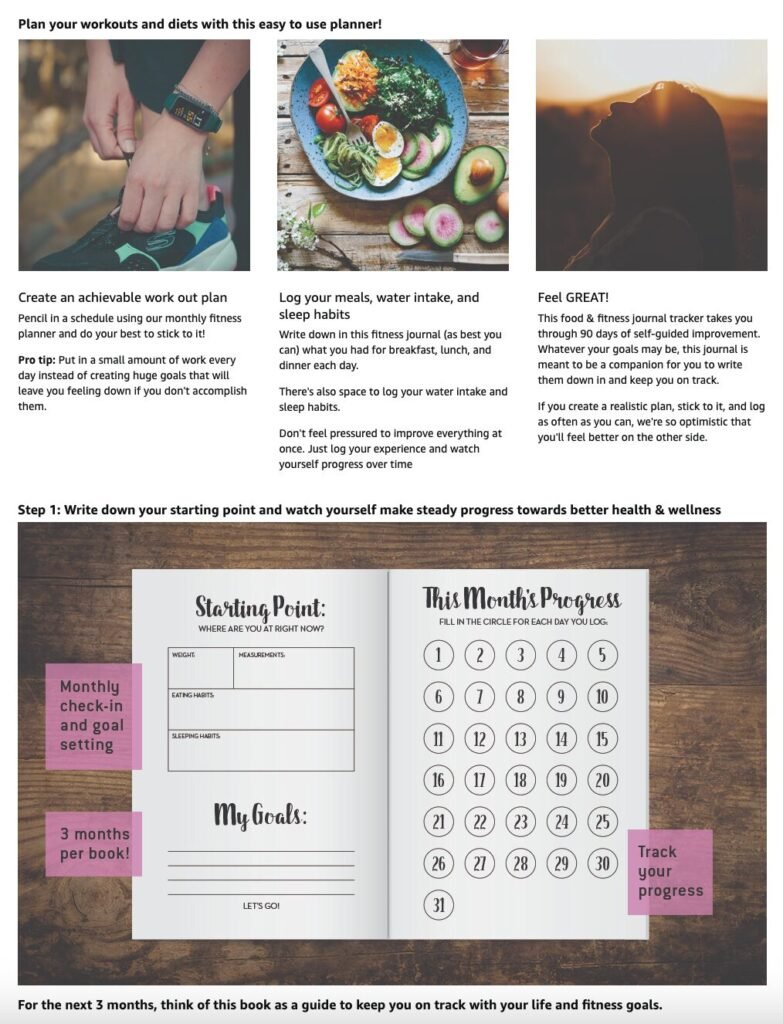
Focus on your reader. What questions might they have about your book? What unique content do you have that they’d need to read the book to find out otherwise? Even a nonfiction, self-help book can include non-text-based content that raises a prospect’s interest in and perception of the book’s value — worksheets, charts and tables, breakout boxes, or end-of-chapter action steps. Your A+ Content section is the ideal place to showcase it.
Share your book’s secret sauce. What’s unique about your book that the reader needs to know? Show it as much as you can using visuals, and tell them about it using text.
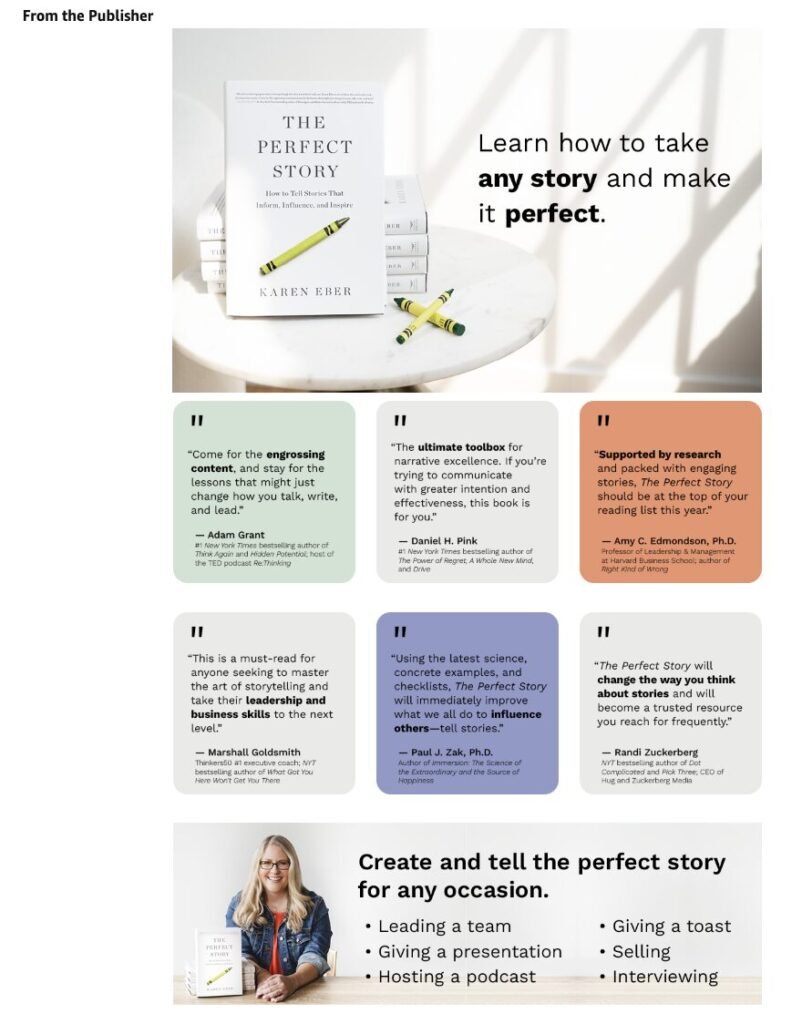
Provide more information about the book – maybe answer a few frequently asked questions right there in the module.
Showcase additional features, like added-value sections such as worksheets, charts, or indexes.
Use social proof to boost trust and credibility. People might be skeptical of what you say about your own book, but they trust endorsements, media quotes, and reviews — even from people they don’t personally know. Including some of these in your A+ Content reinforces the know, like, trust experience.
Don’t Skip the Alt Text
Besides making your listing look better, A+ Content helps turn prospects into buyers by giving them more product information – and it’s searchable, which helps your discoverability on Amazon.
Here’s the catch: while images aren’t searchable, Amazon lets you add alt text (keywords) to each one. If you have more than one image, use different keywords across them to maximize the variety of terms your listing can be found under. Alt text is meant to help screen reader applications, so try to have it describe the image while working in your keywords.
A caution straight from Amazon: submitting image alt text that doesn’t describe the image – and wouldn’t be useful to someone using a screen reader – can result in content rejection.
The Bottom Line
A+ Content can increase your book sales in a few ways:
- Alt tags – additional SEO terms that can help increase your book’s discoverability and visibility on Amazon
- Enhanced information – additional information that helps inform prospects and sells them further on your book
- Professional presentation – a listing that looks professional, which increases prospect trust and helps them feel confident buying from an unknown author
Amazon has strict guidelines around A+ Content, so it’s a good idea to review them before you start building yours out.
This is just one piece of the full picture – A+ Content is one chapter of The Self-Publisher’s Amazon Playbook, where I walk through the complete system for optimizing a book listing on Amazon.
FAQ: A+ Content for Self-Published Authors
Is A+ Content free?
Yes – it’s a free tool available to all authors through the KDP Marketing page.
Where does A+ Content appear on a book listing?
Under “From the Publisher,” near the middle of the detail page. Most readers have to scroll to see it.
How much can A+ Content actually increase sales?
Basic A+ Content can increase sales by up to 8%. Well-implemented Premium A+ Content can increase sales by up to 20%.
How many modules can I use?
Up to seven, and you can choose from several Amazon templates to lay them out.
Is A+ Content searchable?
The images themselves aren’t, but the alt text you add to each image is – and that’s what helps your discoverability on Amazon.
What should I avoid when writing alt text?
Don’t submit alt text that doesn’t actually describe the image. Amazon can reject content if the alt text wouldn’t be useful to someone using a screen reader.
How is A+ Content different from the regular book description?
The standard listing caps you at about two thousand characters of text with no images beyond the cover. A+ Content lets you add graphics, layout, and a fuller visual story beyond that limit.
What should I include to build reader trust?
Professional graphics, clean copy, social proof (testimonials, endorsements, media mentions), an author photo, additional product shots, interior views, and a clear sense of who the book is for.
 It’s been said that your book is your best business card. In many ways it is, because as it introduces you, it also positions you as a credible expert.